The AI does a lot of the work. But the photo you upload is the one thing that determines whether the result looks genuinely like your child or just roughly like a child.
One good photo produces a good book. One poor photo produces a book where the illustrations are in the right style but something feels slightly off. Parents notice. The child notices.
This guide tells you exactly what to upload, what to avoid, and why each thing matters.
What makes a good photo
The face should be the main subject. Not a full-body shot. Not a photo where the child is one of several things in the frame. The AI is reading the details of your child's face: their features, their proportions, the way they look. It needs those details to be clearly visible. A photo where the face takes up a good portion of the frame gives it what it needs.
Face on, or close to it. A photo taken straight on, or at a slight angle, works well. A strong side profile makes the AI's job harder because it only has half the information it needs. Front-facing or nearly front-facing is the target.
Clear, natural light. Good natural daylight or a well-lit indoor photo is ideal. Harsh shadows across the face, heavy backlighting where the face goes dark, or a photo taken in a very dim room all reduce the detail the AI can work with. You're not looking for a professional setup. Just enough light that you can see the child's face properly yourself.
A happy, relaxed expression. Smiling or neutral works best. Not because sad or angry faces can't be processed, but because the story is a joyful adventure. A child who looks delighted in the source photo tends to look delighted in the illustrations. The expression carries through.
The face and hair fully in frame. Nothing cropped at the top of the head. Nothing touching the edge of the photo. Hair included. This gives the AI the full picture to work with.
The instructions image
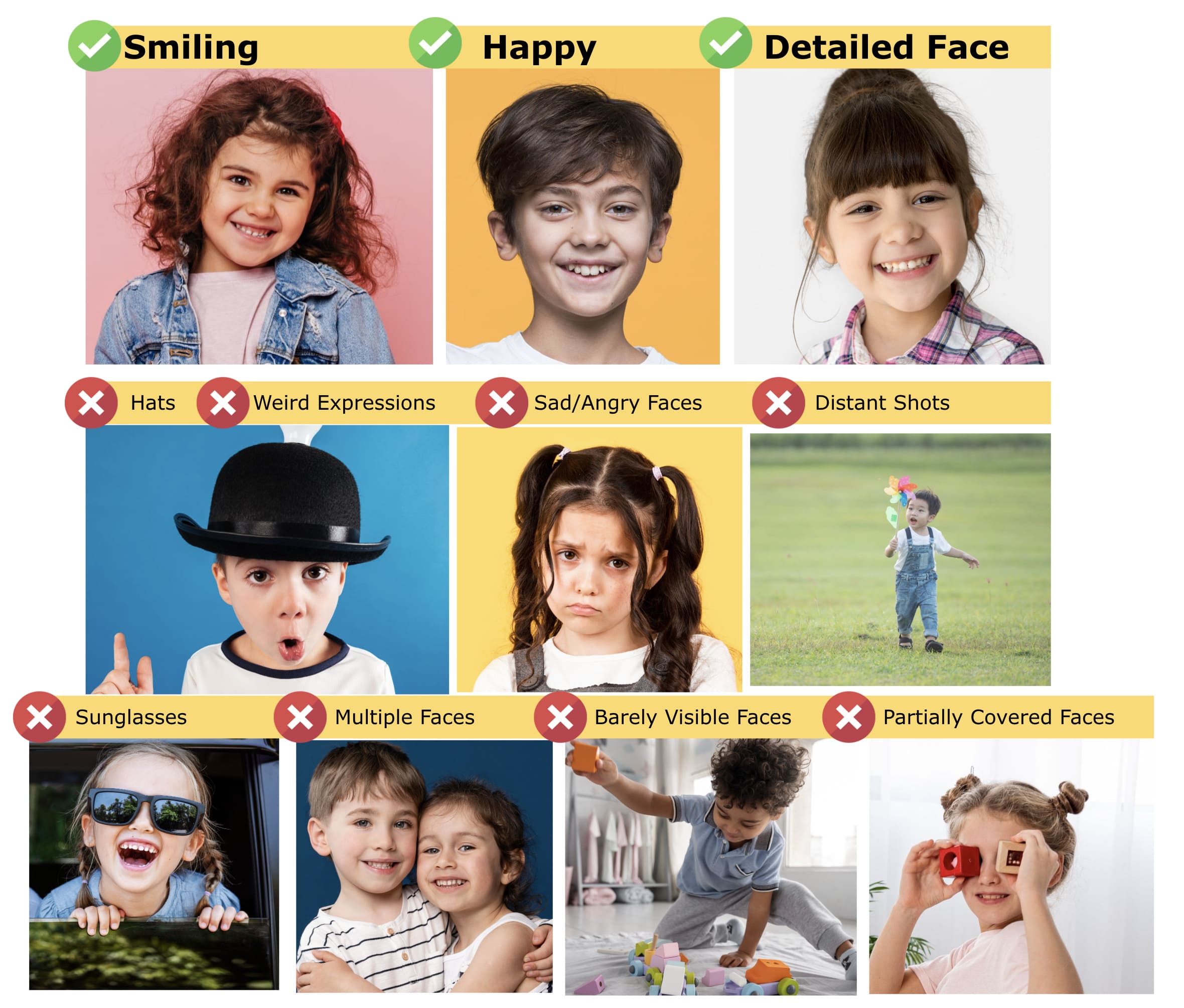
The image above shows exactly what good and bad photos look like side by side. It's the same guide shown on the upload page. The examples make it easy to check your photo against before uploading.
What to avoid, and why
Hats, caps, or anything covering the hair. Headwear hides the shape of the head and part of the face. The AI fills in what it can't see, and the fill is never as accurate as the real thing. If you have a great photo of your child in their favourite cap, save it for something else. Upload the one without.
Sunglasses or any glasses that cover the eyes. The eyes are the most important part of a face for likeness recognition. Sunglasses hide them entirely. Regular prescription glasses are fine as long as they don't have strong reflections or tinted lenses.
Multiple faces in the frame. If another child, sibling, or adult is visible in the photo, the AI has to decide which face to work from. For a single-child book, upload a photo where only your child is the clear subject. If you're ordering a Friends or Twins book, upload separate photos for each child.
Distant shots where the face is small. A photo from across the room at a birthday party, a beach shot where the child is far away, a group photo where everyone is small. These don't give the AI enough facial detail to work with. Get closer.
Partially covered faces. A hand in front of the face, another person overlapping, a scarf or collar pulled up. Anything that hides part of the face reduces the accuracy of the result. The full face, clearly visible, is what you're going for.
Blurry or low-resolution photos. A blurry photo produces a blurry result. If you can't see your child's features clearly in the photo, the AI can't either. Most photos taken on a modern phone in decent light are fine. Old, heavily compressed, or very small images sometimes aren't.
Unusual expressions. Pulling a silly face, mid-sneeze, eyes closed, looking away. These are fine as memories but not as reference photos. The AI takes the expression in the photo and works from it. Neutral or smiling produces a natural result. Everything else is a gamble.
How many photos to upload
One photo is enough for the book to be made. More photos produce a better result.
When you upload two or three good photos, the AI can cross-reference details between them: the shape of the face from slightly different angles, the way the eyes look in different light, the exact shade of hair. The result is a more accurate likeness.
If you have three clear photos, upload all three. If you only have one good one, upload that and trust it.
The photos can be from different days or different ages, as long as the child looks roughly the same as they do now. A photo from two years ago when they had much longer hair and a very different face shape is less useful than something recent.
A practical checklist before you upload
Before you hit upload, run your photo through these quickly:
- Face clearly visible, taking up a good portion of the frame
- Looking forward or close to forward
- No hat, sunglasses, or face covering
- No other people visible or clearly in front of/behind
- Decent light, no heavy shadows across the face
- In focus, not blurry
- Happy or neutral expression
If your photo passes all of those, you're in good shape. If you're unsure between two photos, upload both. The AI picks the best signal from what you give it.
After you upload
Once your photos are in, the book generates in a few minutes. When the preview loads, look at it properly before approving.
Does it look like your child? Does the expression feel right? Is the likeness strong?
If something feels off, you can go back and try a different photo before placing your order. Nothing is locked in until you approve and pay. The preview exists exactly so you can check the result and decide whether you're happy with it.
Most people are. But the photos in this guide are the reason why.